Download Managers
Download managers are software tools designed to optimize and manage the downloading of files from the internet, offering features like faster speeds, pause/resume capabilities, and the ability to handle large or multiple files more efficiently than standard web browsers.
Jdownloader2
JDownloader is a free, open-source download management tool with a huge community that makes downloading as easy and fast as it should be. Users can start, stop or pause downloads, set bandwith limitations, auto-extract archives and much more. It's an easy-to-extend framework that can save hours of your valuable time every day!
Debloating
- Once finished installing the software, open it and go to
Settings -> (⚠️) Advanced Settings, In "Filters Settings", search for the following and disable all of them (by clicking on the check-mark button)
First value you should search for is "premium alert".
Second value is "oboom".
Third value you need to search for is "Special Deals".
Fourth value - "Donate".
Fifth and last value you gotta search for is "Banner". - After you finished disabling all of them values above, you have a debloated Ad-free JDownloader.
you should no longer see ads like "RAPIDGATOR PREMIUM" and more other annoying ones. Enjoy JDownloader now!
Dark mode
- Download The Theme Files Here
- Apply the theme
- In your JDownloader, go to
Settings > Settings > Advanced Settings - Search for
look and feel themeand change the value toFLATLAF_DARK
- Copy the theme files into these directory
See Your <installation-directory> in Help > About JDownloader > Click me / Mouse over, then copy
imagesfolder to<installation-directory>/themes/standard/org/jdownloaderlaffolder to<installation-directory>/cfgflatlaf.jarto<installation-directory>/libs/laf
Choose replace or merge if asked.
- Restart JDownloader or press Ctrl + Shift + R
IDM (Internet Download Manager)
Download Here
Install IDM
- Download and install the latest IDM. Close the IDM if it auto starts (check the hidden items too in the taskbar).
- Download and unzip Ali.Dbg patcher (e.g. IDM 6.4x Patch – v19.7 by Ali.Dbg).
Use 7zip to unzip the file if windows explorer can't unzip the file.
- Double click on
IDM_6.xx_Crack_vX.exeto open the patcher.
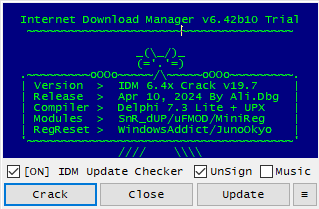
- Unselect
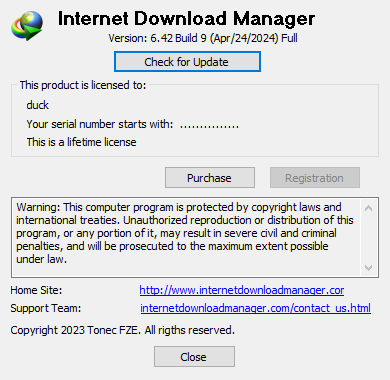
Unsignthen ClickCrack. When it's done patching, it will showOK>Reboot. Then close the patcher. - Reboot your PC and you should be good. You can check it in
Internet Download Manager > Help > About IDM
Updating
If you update, you will have to crack it again. You don't have to reinstall IDM. Just run the patcher after u done updating IDM.
Alternate methods
If you don't like the Ali.dbg patcher, you can try these